Osprey Strike Twilio Deploy Runbook
Where the manual Twilio-hosted pager artifacts live, how to deploy them, and how not to create the wrong Flow · ~15 min read ~– min read · Suggested by Laura engineeringoperations
Most of Osprey Strike deploys through normal GitOps. The pager's Twilio Studio Flow and Serverless Function do not. Until issue 1131 automates that path, operators need a precise manual runbook for identifying the live Flow, rendering the template, publishing the Function, and verifying Twilio accepted the result.
What is manual
Three pager surfaces sit outside ArgoCD: the Studio Flow template at infrastructure/twilio/flow-template.json, the Twilio Serverless Function at infrastructure/twilio/serverless/functions/pager.protected.js, and the Cloudflare Worker source and OpenTofu deployment wrapper under infrastructure/opentofu/cf-worker/. The Go API and Kubernetes config deploy through the normal build and ArgoCD path; these Twilio-hosted artifacts do not.
What to load
Separate credentials from deployment parameters. TWILIO_ACCOUNT_SID and TWILIO_AUTH_TOKEN are account credentials. Keep them in .envrc.local or ~/.jrm/twilio.env, not in pasted commands. Twilio test credentials are mostly useful for console or API test-mode checks; they do not publish live Flow or Function changes. FLOW_NAME, FLOW_HOST, and FUNCTION_URL are per-deploy parameters. Use inline assignments for those so every render/upsert shows exactly what target is being changed.
What not to guess
Read the live Flow before rendering. twilio-flow.sh upsert looks up an existing Flow by FLOW_NAME; a wrong name creates a duplicate Flow instead of updating the one the API calls. Use TWILIO_FLOW_SID=... ./twilio-flow.sh get for the friendly name and get-definition for the current webhook host.
How to deploy the Flow
Preview before publish. Run render | jq . with the live FLOW_NAME, FLOW_HOST, and FUNCTION_URL; review the generated Worker callback URLs, Function URL, and typed fields; then run upsert with the same values. upsert publishes immediately.
How to deploy the Function
Deploy /pager separately. The source is infrastructure/twilio/serverless/functions/pager.protected.js. Until issue 1131 adds automation, publish it through the Twilio Console or twilio serverless:deploy --environment <exact-env>, then confirm the active Function URL still matches the Flow.
How to confirm it worked
Verify both artifacts. Fetch the Flow and definition after publishing, inspect call_agent and call_next_agent_function, confirm the new Twilio Build is active, then smoke test through an active token-bearing twilio_instances row. Mock or token-less rows can silently bypass the policy path.
The 81022 failure mode
Twilio validates widget types before Liquid renders. PR 1149 changed the Flow timeout to {{flow.data.ringTimeout | default: 60}}; the manual deploy failed with code 81022 because the make-outgoing-call-v2 timeout field requires an integer. PR 1156 fixes that by restoring timeout: 60.
Which account
Confirm the account and Flow SID before touching live. The sandbox config currently points at https://redops-dev-2971.twil.io/pager and Flow SID FW0815c9370169ed892180785acf5c886c, but the repo history has enough test/live ambiguity that an operator should treat those as evidence, not authority.
The operator checklist
The short version is source, identify, preview, publish, verify, record. Pull current Osprey source, confirm the Twilio account, read the live Flow name and host, render before upsert, publish the Function, smoke test live behavior, and record the deployed account, Flow SID, Function URL, commit SHA, and result.
The pager deploy path is unusual inside Osprey Strike. The Go API, web app, mock server, and Kubernetes overlays follow the normal merge-to-build-to-ArgoCD route. The Twilio pager artifacts are different: parts of the running behavior live inside Twilio Studio and Twilio Serverless, while the public webhook front door lives in Cloudflare.
That split is why PR 1149 could merge code and still require a manual Twilio deployment, and why PR 1156 had to exist after the manual deploy exposed a Studio schema validation failure. A Git commit changed the source of truth, but Twilio did not receive a working Flow until someone rendered, upserted, fixed, and redeployed the external artifact.
Until issue 1131 automates Twilio Serverless and, ideally, the adjacent Worker path, this is an operational runbook. It is deliberately concrete.
Do not assume a merge deployed the pager Flow or Function. For these artifacts, Git records the desired source, but Twilio changes only when an operator publishes them.
What is manual
The manual Twilio pager deployment has three relevant repo surfaces.
| Surface | Repo path | Hosted where | Deploy behavior |
|---|---|---|---|
| Studio Flow | infrastructure/twilio/flow-template.json |
Twilio Studio | Render and upsert with infrastructure/twilio/twilio-flow.sh. |
| Serverless Function | infrastructure/twilio/serverless/functions/pager.protected.js |
Twilio Serverless | Paste and deploy in Console, or deploy with Twilio CLI/Serverless Toolkit. |
| Webhook Worker | infrastructure/opentofu/cf-worker/ |
Cloudflare Workers | Deploy through OpenTofu, not ArgoCD. |
The Kubernetes/API side is still normal GitOps. In the sandbox-mode API config, for example, PAGER_PROVIDER is set to twilio, TWILIO_FUNCTION_URL points at https://redops-dev-2971.twil.io/pager, TWILIO_FLOW_SID points at FW0815c9370169ed892180785acf5c886c, and TWILIO_FROM_NUMBER supplies the outbound caller ID. When that config changes and lands in the cluster, ArgoCD handles it.
The Studio Flow and Serverless Function are not in that pipeline. They must be pushed to Twilio itself.
The Cloudflare Worker is related but not the same deploy. The Flow’s HTTP widgets post pager status callbacks to a webhook host. The Worker validates Twilio’s signature at that public host, derives the backend environment from the hostname, and forwards to <env>-gw.constructured.com with Cloudflare Access service credentials. That means a Flow deploy must preserve the correct public Worker host, but it does not redeploy the Worker.
The Studio Flow owns the call interaction state, the Serverless Function chooses the next call execution, and the Cloudflare Worker is the public signed-webhook front door into Strike.
What to load
Treat the environment variables in two groups.
Credential variables identify and authenticate to the target Twilio account:
| Variable | Meaning | Handling |
|---|---|---|
TWILIO_ACCOUNT_SID |
Twilio account SID for Studio API calls. | Sensitive enough to keep out of random logs; must match the token. |
TWILIO_AUTH_TOKEN |
Twilio auth token for API auth and signature validation. | Secret. Do not paste into shell history or PR comments. |
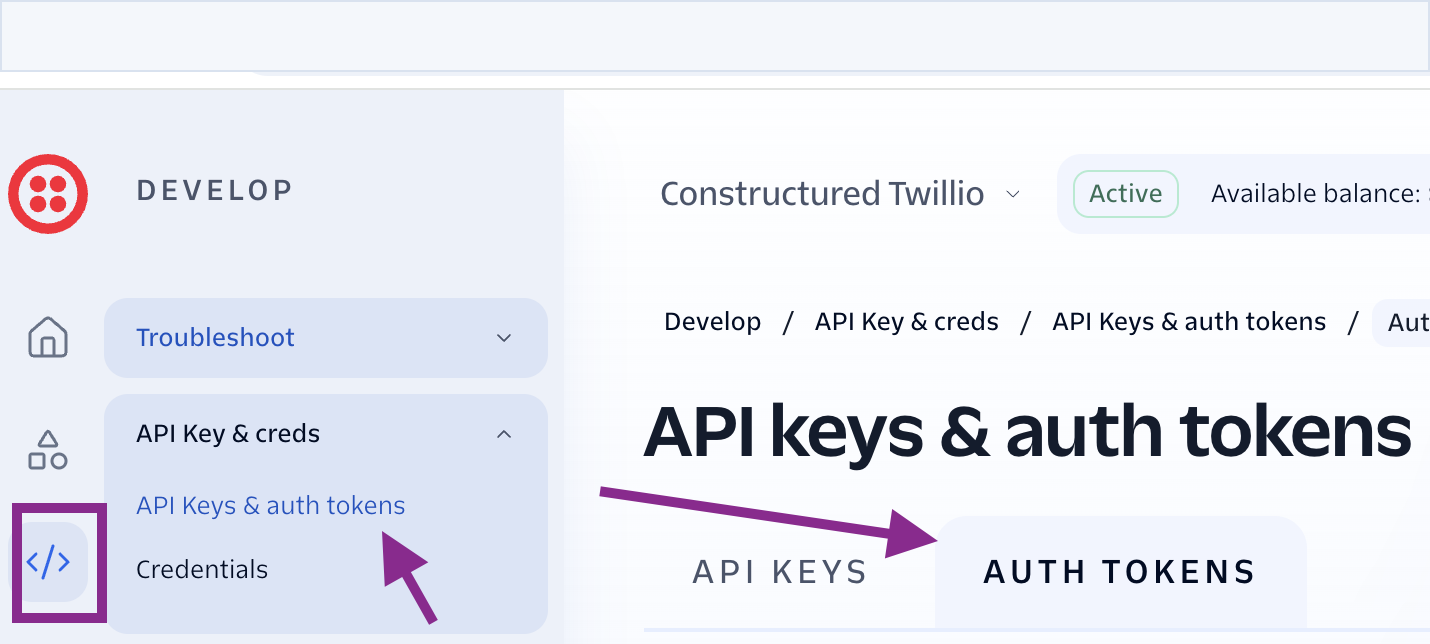
Twilio also exposes test credentials in the Console. Those are useful for constrained console or API test-mode checks, but they are not a replacement for the live account credentials needed to publish Studio Flow or Serverless Function changes.
Deployment parameters describe the artifact you are about to render or publish:
| Variable | Meaning | Handling |
|---|---|---|
FLOW_NAME |
Friendly name used by upsert to find an existing Studio Flow. |
Read from the live Flow; do not invent it. |
FLOW_HOST |
Host used to build https://${FLOW_HOST}/webhooks. |
Read from the live Flow definition; docs contain old examples. |
FUNCTION_URL |
Twilio Serverless Function URL used by the Flow’s run-function widget. |
Confirm for the target account/environment. |
TWILIO_FLOW_SID |
Optional direct Flow SID for get, get-definition, and upsert. |
Use it when identifying an existing Flow. |
The practical load order for a human shell should be:
- Let direnv load repo-local development defaults and
.envrc.localif you use it. - Put stable Twilio credentials in
~/.jrm/twilio.envwhen usingtwilio-flow.sh; the script sources that file automatically. - Put per-deploy values inline on the command line:
FLOW_NAME=... FLOW_HOST=... FUNCTION_URL=... ./twilio-flow.sh render.
Keep secrets out of visible command history. The safest pattern is for ~/.jrm/twilio.env to contain only credentials:
export TWILIO_ACCOUNT_SID="AC..."
export TWILIO_AUTH_TOKEN="..."
Then keep target parameters explicit and non-secret at invocation time. If you need to override credentials for one command, do not paste the token into a Slack-visible terminal transcript or a saved shell history entry. Use a temporary env file, a password-manager shell injection, or a subshell that disables history before exporting the secret.
FLOW_NAME is not cosmetic. twilio-flow.sh upsert searches by friendly name when TWILIO_FLOW_SID is absent; if it does not find a match, it creates a new Flow.
What not to guess
Before rendering or publishing, identify the live Flow from the target Twilio account.
The manual path is Twilio Console -> Studio -> Flows, then choose the Flow for the target environment and copy its SID. If you are operating from the application’s database instead, read the active Twilio instance for that environment:
SELECT flow_sid,
       is_active,
       ring_timeout_seconds,
       max_call_attempts,
       escalation_phone
FROM twilio_instances
WHERE is_active = true;
Treat that query as environment-scoped evidence: run it against the target environment’s database, verify that exactly one active row matches the deployment you intend to touch, and avoid exposing escalation_phone in public transcripts.
Start with the Flow SID when you have one from the deployed API config or the Twilio Console:
cd infrastructure/twilio

TWILIO_FLOW_SID="FW..." ./twilio-flow.sh get | jq -r '.friendly_name'
That output is the FLOW_NAME to use for render and upsert. Copy it exactly.
Then read the current webhook host from the live Flow definition:
TWILIO_FLOW_SID="FW..." ./twilio-flow.sh get-definition \
  | jq -r '.. | .url? // empty' \
  | grep -i webhooks \
  | sort -u
The matching host becomes FLOW_HOST unless you deliberately use BASE_URL to override the whole webhook base. Prefer FLOW_HOST for ordinary deploys because it makes the rendered base URL predictable:
FLOW_HOST=webhooks-main.constructured.com
BASE_URL=https://webhooks-main.constructured.com/webhooks
This read-before-write step matters because old examples used different host families. The current OpenTofu cf-worker configuration lists webhooks-demo.constructured.com, webhooks-main.constructured.com, and personal webhooks-<env>.constructured.com hosts. Other docs and examples mention UI hosts such as osprey-main.constructured.ai, backend gateway hosts such as main-gw.constructured.com, and older backend examples under redshifted.dev.
Those names are not interchangeable. Twilio calls the public Worker host. The Worker forwards to the backend gateway. The Strike UI host is neither of those.
The live Flow definition is the source of truth for the webhook host during a manual update. If the docs disagree, read the Flow and then confirm with Noam or Bob before publishing.
How to deploy the Flow
Work from the Osprey Strike repo:
cd infrastructure/twilio
First, preview the rendered Flow. Use the exact friendly name and webhook host read from the live Flow:
FLOW_NAME="<friendly name from get>" \
FLOW_HOST="<webhook host from get-definition>" \
FUNCTION_URL="https://redops-dev-2971.twil.io/pager" \
  ./twilio-flow.sh render | jq .
Review the rendered JSON for three things:
- All pager callback URLs use the expected Worker base, such as
https://webhooks-main.constructured.com/webhooks/pager/accepted. - The
call_next_agent_functionwidget points at the expectedFUNCTION_URL. call_agent.properties.timeoutis an integer, not a Liquid string.call_agenthas answering-machine detection enabled, andcheck_answered_bysends machine or fax answers tohttp_failedinstead of reading the pager prompt to voicemail.
Then publish:
FLOW_NAME="<friendly name from get>" \
FLOW_HOST="<webhook host from get-definition>" \
FUNCTION_URL="https://redops-dev-2971.twil.io/pager" \
  ./twilio-flow.sh upsert
upsert renders the compact Flow definition and posts it to Twilio Studio with Status=published. If it finds the Flow by TWILIO_FLOW_SID or by FLOW_NAME, it updates the existing Flow. If it cannot find a matching friendly name and no SID is supplied, it creates a new Flow.
For a live target, confirm the target account and Flow SID with the operator who owns the Twilio account before this step. The repo currently shows redops-dev-2971 in sandbox-mode config, but the PR 1149 deployment note explicitly called the account/environment mapping muddled enough to require human confirmation.
How to deploy the Function
The Function source lives at:
infrastructure/twilio/serverless/functions/pager.protected.js
It is the controller for sequential pager calls. On first entry, Strike posts the contact list and callout context. On each no-answer, voicemail/fax answer, decline, failure, or loop transition, the Studio Flow re-enters the Function through the call_next_agent_function widget. The Function chooses the next contact, starts a new Studio Flow execution, loops the list up to maxAttempts, and dials escalationPhone once when configured.
The Function also carries the callout policy state between Studio executions. ringTimeout, maxAttempts, escalationPhone, loop, and escalated are forwarded by the Flow and rebuilt into each chained execution’s parameters. maxAttempts is interpreted as the number of complete passes through the contact list. When those passes are exhausted, the Function dials escalationPhone once if one is configured, marks the run escalated, and then falls through to the terminal exhausted state on any later failure. The ringTimeout value is still carried for future compatibility, but the current Studio Flow cannot apply it dynamically because Twilio requires the outgoing-call timeout field to be a literal integer.
Escalation accepts are intentionally unattributed to a pager-list contact. The escalation call uses an agent object with the name Escalation and no contact id, so /pager/accepted receives an empty contactId; the backend records the accept without trying to attach it to a contact row.
There is not yet repo deploy tooling for this Function. Use one of two manual paths.
Console path:
- Open the target Twilio account.
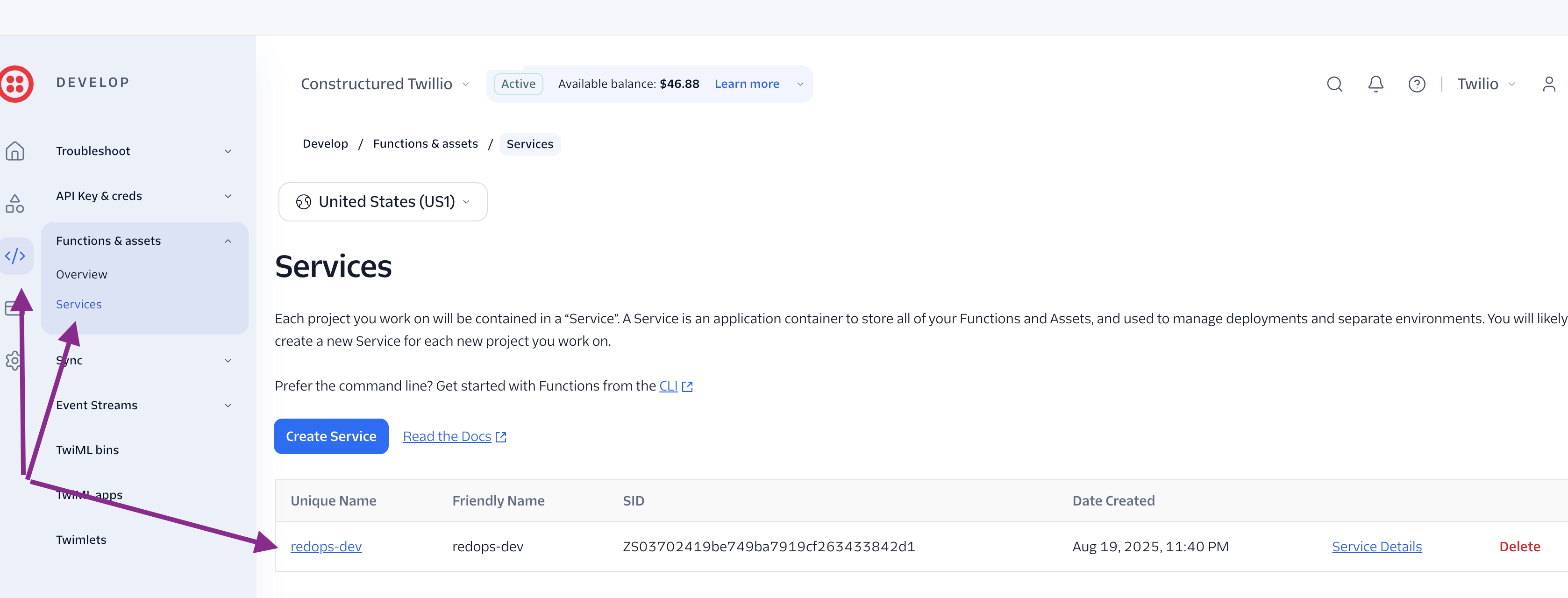
- In the left navigation, open Functions & assets, then Services.
- Open the service that owns the pager Function. In the captured development account, that service is
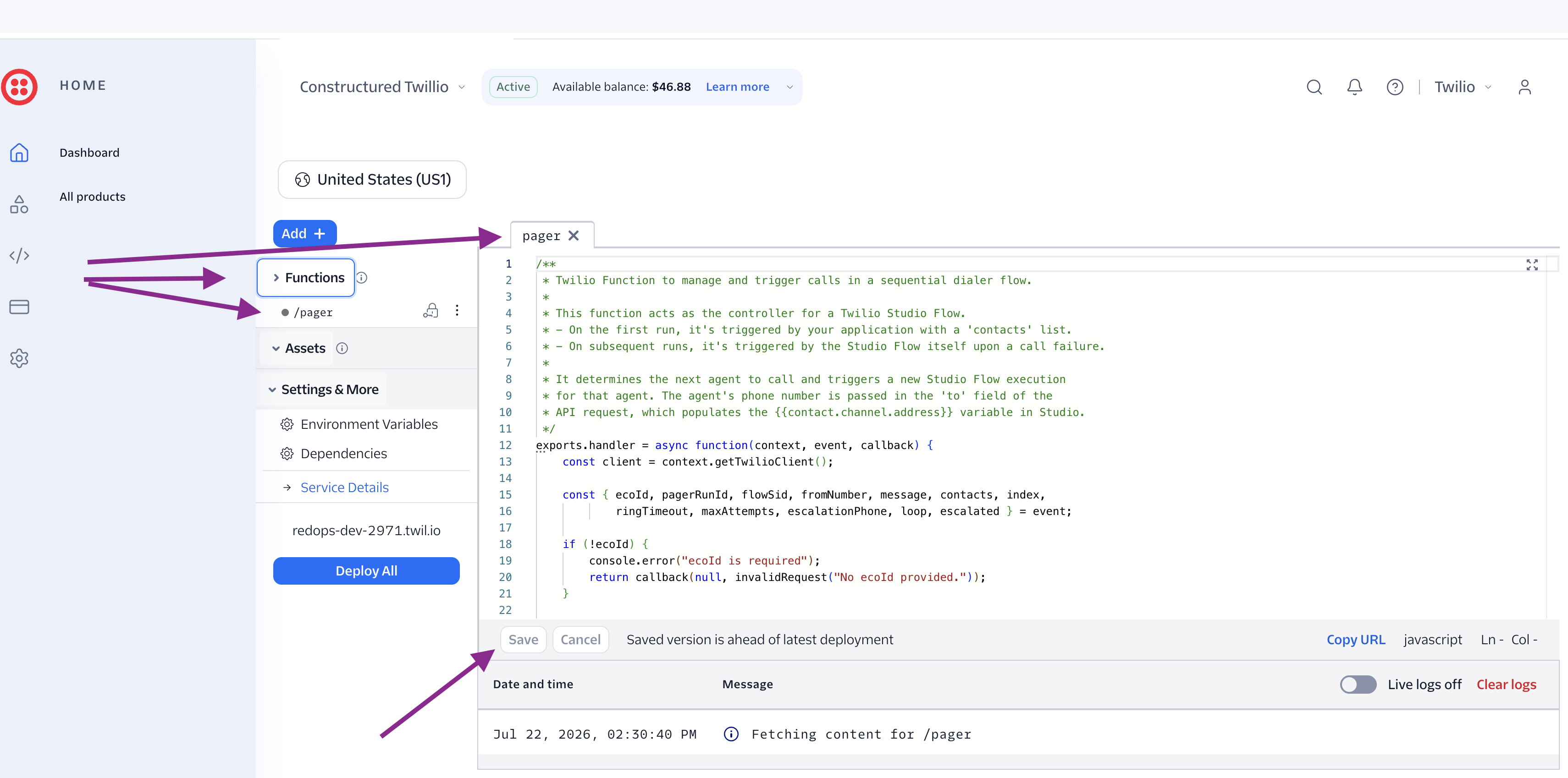
redops-dev. - In the Function editor, expand Functions and open
/pager. - Paste the current
pager.protected.jssource. - Click Save, then Deploy All to publish a new active Build.
CLI path:
twilio serverless:deploy --environment <exact-env>
Pin the environment explicitly. A typo can create or deploy to an unintended environment. The deployment comment on PR 1149 also called out TWILIO_SERVERLESS_API_CONCURRENCY=1; keep that setting for Function deploys until the automated path in issue 1131 makes this reproducible.
Function deploys create and activate a new Twilio Build. After deploying, confirm the active Function URL still matches the FUNCTION_URL used in the Flow render.
How to confirm it worked
For the Flow, confirm Twilio accepted and published the definition:
TWILIO_FLOW_SID="FW..." ./twilio-flow.sh get | jq '{sid, friendly_name, status, revision, valid}'
Then inspect the published definition:
TWILIO_FLOW_SID="FW..." ./twilio-flow.sh get-definition \
  | jq '.states[] | select(.name == "call_agent" or .name == "call_next_agent_function")'
Check that:
call_agent.properties.timeoutis an integer.call_agent.properties.detect_answering_machineistrue, andcheck_answered_byroutes machine/fax matches tohttp_failed.call_next_agent_function.properties.urlis the intended Function URL.- The Function parameters include
flowSid,fromNumber,message,contacts,index,ecoId,pagerRunId,ringTimeout,maxAttempts,escalationPhone,loop, andescalated.ringTimeoutshould be present in the chained parameters, but it is not yet applied tocall_agent.properties.timeout.
For the Function, confirm the Twilio Console shows the new active Build and that /pager resolves under the expected Twilio domain. If using CLI, inspect the deploy output and the Console; do not rely only on local command success.
Then run a live smoke test against a NOC with an active, token-bearing Twilio instance:
- Set System Configuration -> Voice callout knobs for a controlled test:
maxAttempts=1and a known escalation number. Treat the ring window as fixed at the Flow’s literal timeout until the timeout implementation changes. - Start an ECO pager run with test contacts.
- Confirm the first contact is called from the expected Twilio number.
- Decline or let the call fail and watch the next Function execution.
- Confirm
maxAttempts=1reaches terminal exhaustion after one pass. - Confirm escalation dials once when configured.
- Let a call go to voicemail and confirm it is treated as failed, not accepted or prompted.
- Confirm an escalation accept records the pager run acceptance even though it is not tied to a pager-list contact.
- Confirm permanent send/call failure skips to the next contact rather than wedging the run.
The token-bearing instance detail matters. PR 1149’s deployment note recorded that the callout policy only takes effect on the live database-instance path. If Strike falls back to env-level provider config, the policy values are not present even though Twilio may still place calls.
A mock or token-less twilio_instances row can make the test look like Twilio is ignoring policy. Verify the active row has a decryptable auth token before debugging the Flow.
The 81022 failure mode
The sharpest edge from the PR 1149 deploy was a Studio validation error:
code 81022: string found, integer expected at #/states/1/properties/timeout
The failing definition set the make-outgoing-call-v2 widget timeout like this:
"timeout": "{{flow.data.ringTimeout | default: 60}}"
Twilio rejected it before Liquid could render because that widget field is typed as an integer. Other fields in the same widget accept strings, so nearby string values do not prove timeout can be templated. PR 1156 fixes the deploy blocker by restoring:
"timeout": 60
That means true per-instance ring timeout is not currently implemented through the Studio widget. The remaining ringTimeout plumbing in Go, Flow parameters, and Function event parsing is carried forward but inert until the implementation changes. Two realistic follow-ups are a deploy-time integer substitution into the Flow template, or moving call placement into the Function where timeout can be set per API request.
N-loop and escalation are different. They live in pager.protected.js and are not blocked by the Studio widget timeout schema. The current Function carries loop and escalation state explicitly so a configured escalation number is called only once after the normal contact passes are exhausted.
The current Flow also enables answering-machine detection. After call_agent reports AnsweredBy, check_answered_by matches Twilio’s machine and fax values and posts a failed callback before moving to the next agent. That is the fail-fast behavior operators should expect when a call is answered by voicemail.
Which account
Do not treat redops-dev-2971 as a universal answer. It is a concrete clue in the repo, not the full account map.
The current sandbox-mode API config says:
| Setting | Value |
|---|---|
TWILIO_FUNCTION_URL |
https://redops-dev-2971.twil.io/pager |
TWILIO_FLOW_SID |
FW0815c9370169ed892180785acf5c886c |
TWILIO_FROM_NUMBER |
+15015047082 |
That likely describes the sandbox target. It does not by itself prove which account is the live production target, and it does not tell you which friendly name upsert must use. The safe sequence is:
- Confirm whether the deploy target is test, sandbox, demo, main, or live.
- Confirm the Twilio account credentials belong to that target.
- Confirm the Flow SID from the API config, Twilio Console, or operator handoff.
- Read
FLOW_NAMEandFLOW_HOSTfrom that Flow. - Render, review, then upsert.
For SMS specifically, the newer System Configuration flow and the earlier Twilio SMS Global Settings cairn use webhooks-<env>.constructured.com as the public Worker callback host. That same cairn now records where Twilio Messaging Service Opt-out Management lives for STOP, START, UNSTOP, and HELP behavior. Pager Flow callbacks should follow the live Flow and Worker configuration, not an old example copied from redshifted.ai or redshifted.dev documentation.
The operator checklist
Use this condensed sequence for a manual pager deploy:
- Pull the current Osprey Strike source and inspect the Flow diff, Function diff, and PR notes.
- Confirm the target Twilio account and environment with Noam or Bob for live-impacting deploys.
- Load
TWILIO_ACCOUNT_SIDandTWILIO_AUTH_TOKENfrom a safe local secret source. - Read
FLOW_NAMEfrom the target Flow withTWILIO_FLOW_SID=... ./twilio-flow.sh get. - Read
FLOW_HOSTfrom the target Flow withget-definition; do not guess from docs. - Render with explicit
FLOW_NAME,FLOW_HOST, andFUNCTION_URL; review the generated URLs and integer-typed fields. - Upsert the Flow and confirm Twilio reports it published.
- Deploy
pager.protected.jsto the matching Twilio Serverless environment. - Confirm the active Function URL and Flow definition agree.
- Run a live smoke test through an active token-bearing instance.
- Record the deployed Flow SID, Function URL, Twilio account/environment, commit SHA, and smoke-test result in the PR or deployment thread.
- The pager Twilio artifacts are manual today. The Flow, Function, and Worker are repo-backed but not ArgoCD-deployed.
- Credentials and parameters are different things. Keep `TWILIO_ACCOUNT_SID` and `TWILIO_AUTH_TOKEN` in a safe local secret source; keep `FLOW_NAME`, `FLOW_HOST`, and `FUNCTION_URL` explicit per deploy.
- Read the live Flow. A wrong `FLOW_NAME` creates a duplicate Flow, and the webhook host is ambiguous across older docs.
- Preview before publish. `render | jq .` should show the expected Worker URLs, Function URL, and integer `timeout` field before `upsert` publishes.
- Studio type validation is real. Liquid in the integer `timeout` field fails with 81022; PR 1156 documents the fix.
- Confirm the account map. `redops-dev-2971` and the sandbox Flow SID are evidence for the sandbox path, not blanket permission to deploy live.
- Should issue 1131 automate only the Serverless Function first, or should the Flow render/upsert path be included in the same workflow?
- Where should the authoritative test/demo/main Twilio account map live so deploys no longer depend on Slack memory?
- Should the Flow script require `TWILIO_FLOW_SID` for updates to prevent accidental duplicate Flow creation?
- Osprey Strike PR 1149 - The configurable callout policy PR and deployment comment that recorded the manual Flow and Function deploy procedure.
- Osprey Strike PR 1156 - The corrective PR for Twilio Studio error 81022 on the integer `timeout` field.
- Osprey Strike issue 1131 - The tracked follow-up to automate Twilio Serverless Function deploys.
- Twilio SMS Global Settings - The related runbook for deployment-global SMS callback configuration and Worker host derivation.
- NOC-Scoped Does Not Mean NOC-Owned - The ownership model for Strike-managed telephony plumbing.
Generated by Cairns · Agent-powered with Claude